Formatting in American Psychological Association (APA) 7th Edition Style: Guidelines, Template, Citation Generator
In this article, you’ll learn about
- Page Setup & General Formatting
- How to format a title page in APA style
- How to format the abstract and keywords in APA style
- How to format headings and structure a paper in APA style
- How to format the body text in APA style
- How to format in-text citations in APA style?
- How to format quotations in APA style?
- How to format tables and figures in APA style
- How to format the reference list in APA style
- Frequently Asked Questions
Page Setup & General Formatting
Before writing a single word, configure your document to meet APA 7 standards. These settings apply to every page of the manuscript.
| Setting | APA 7th Edition Requirement |
| Paper Size | 8.5 × 11 inches (US Letter) |
| Margins | 1 inch on all sides (top, bottom, left, right) |
| Font | One consistent font throughout (see options below) |
| Font Size | 12 pt for body text; some elements may use 10–11 pt |
| Line Spacing | Double-spaced throughout, including references |
| Paragraph Indent | 0.5 inch (first line of every paragraph) |
| Alignment | Left-aligned (flush left, ragged right) |
| Page Numbers | Top-right corner, starting with page 1 on title page |
| Running Head | Required for manuscripts submitted for publication only |
Which font can I use in APA style?
APA 7 allows several fonts. Choose one and use it consistently throughout the entire paper:
| Font Family | Recommended Size | Notes |
| Times New Roman | 12 pt | Most traditional choice; widely accepted |
| Arial | 11 pt | Clean sans-serif option |
| Calibri | 11 pt | Default in Microsoft Word; acceptable |
| Georgia | 11 pt | Readable serif; good for screen reading |
| Lucida Sans Unicode | 10 pt | Compact but clear |
| Computer Modern | 10 pt | Common in LaTeX documents |
⚠️ Key Change from APA 6: APA 7 no longer requires only Times New Roman. It also eliminates the running head for student papers, requiring it only for manuscripts submitted for publication.
APA 7 formatting template
Here’s a free template for APA 7th edition formatting, for a research paper meant to be submitted to a journal:APA7_Journal_Article_Template
How to format a title page in APA style
APA 7 distinguishes between two types of title pages. Ensure you are using the correct format for your context.
Student vs. Professional Title Pages
The requirements for a title page differ if you are a student writing a thesis/dissertation/essay or a researcher/professional writing a research paper meant for a journal. Check the table below.
| Element | Student Paper | Professional / Manuscript |
| Paper Title | ✅ Required | ✅ Required |
| Author Name(s) | ✅ Required | ✅ Required |
| Institutional Affiliation | ✅ Required | ✅ Required |
| Course Number & Name | ✅ Required | ❌ Not included |
| Instructor Name | ✅ Required | ❌ Not included |
| Assignment Due Date | ✅ Required | ❌ Not included |
| Running Head | ❌ Not required | ✅ Required |
| Author Note | Optional | ✅ Required |
| ORCID iD | Optional | Recommended |
Title Page Formatting Rules
- The paper title appears approximately 3–4 lines down from the top of the page, centered and in bold.
- Titles should be 12–15 words maximum; capitalize all major words (title case).
- The author’s name appears one double-spaced line below the title, centered, in standard (non-bold) text.
- Institutional affiliation appears one double-spaced line below the author name.
- All title page content is centered and double-spaced.
- Do not use “by” before the author’s name.
- Multiple authors are listed in the order of their contribution; separate with commas and “and” before the last author.

How to format the abstract and keywords in APA style
Abstract Requirements
- The abstract appears on page 2, on its own page.
- The word “Abstract” is centered, bolded, and appears at the top of the page — do not italicize or underline it.
- The abstract body is a single, non-indented paragraph.
- Word limit: 150–250 words (check with your journal or instructor).
- It must be self-contained — fully understandable without reading the paper.
- Write in third person and use past tense for completed work.
- Do not cite references in the abstract unless absolutely necessary.
What to Include in the Abstract
| Component | Description |
| Research Problem | What question or problem the study addresses |
| Participants / Materials | Who or what was studied (sample size, characteristics) |
| Method | Key methodological approach used |
| Results | Main findings of the study |
| Conclusions | Implications or significance of the findings |
How to format keywords in APA style
- Keywords appear below the abstract, on the same page.
- Start with the label Keywords: in italics, followed by a colon.
- List 3–5 keywords, lowercase, separated by commas.
- Keywords are not bolded and not followed by a period.
Example
Keywords: cognitive load, working memory, educational psychology, metacognition
How to format headings and structure a paper in APA style
APA 7 uses a 5-level heading system. Use only as many levels as needed — start with Level 1 and work downward. Do not skip levels.
The 5 Heading Levels at a Glance
| Level | Format | Example |
| 1 | Centered, Bold, Title Case | Method |
| 2 | Left-aligned, Bold, Title Case | Participants |
| 3 | Left-aligned, Bold, Italic, Title Case | Inclusion Criteria |
| 4 | Indented, Bold, Title Case, ends with period. Text begins on same line. | Age and Gender. Participants ranged… |
| 5 | Indented, Bold, Italic, Title Case, ends with period. Text begins on same line. | Recruitment Procedure. Volunteers were… |
Visual Reference for Heading Levels
Key Heading Rules
- The section label “Introduction” is never used as a heading. The paper’s title at the top of page 3 implies the introduction.
- “References”, “Abstract”, and “Appendix” are centered and bolded. They follow Level 1 style.
- Do not number or letter your headings (e.g., avoid “1. Method” or “A. Participants”).
- Each heading level must appear at least twice; if only one subsection is needed, integrate it into the parent section.
💡Tip: Most research papers only need Levels 1–3. Reserve Levels 4 and 5 for complex, multi-layered manuscripts.
How to format the body text in APA style
Paragraph Formatting
- Indent the first line of every paragraph by 0.5 inch using the paragraph settings (not the Tab key).
- All text is double-spaced. There is no line break or extra spacing between paragraphs.
- Write in active voice where possible (“The researchers analyzed…” rather than “The data were analyzed…”).
- Use the past tense for describing your study and completed research; use the present tense for established findings and your own conclusions.
- Avoid contractions, colloquialisms, and jargon not defined for your audience.
How to format numbers in APA style
APA style has the following rules about using numbers:
| Use Words For… | Use Numerals For… |
| Numbers zero through nine | Numbers 10 and above |
| Numbers beginning a sentence | Numbers before a unit of measurement |
| Common fractions (one-third) | Exact statistical values (p = .03) |
| Rounded large numbers in text (approximately four million) | Scores and scale points (scored 7 on a 10-point scale) |
What does APA style require in terms of bias-free language?
APA 7 places strong emphasis on precise, respectful language. Key principles include:
- Use person-first language unless the individual or group prefers identity-first (“person with a disability” vs. “disabled person” [follow community preference]).
- Use singular “they” for gender-neutral references to a single person.
- Specify group characteristics only when relevant to the research.
- Avoid outdated or offensive terminology; consult the APA Inclusive Language Guide.
How to format in-text citations in APA style?
APA 7 uses an author-date citation format. Every citation in the text must have a corresponding entry in the Reference List, and vice versa.
Basic Citation Formats + Free Citation Generator
The table below gives an overview of how to format in-text citations in APA style. If you’re short on time, you can use Paperpal’s free APA citation generator to format your citations and reference list too.
| Scenario | Format | Example |
| 1 author — parenthetical | (Surname, Year) | (Miller, 2021) |
| 1 author — narrative | Surname (Year) | Miller (2021) found… |
| 2 authors | (Surname & Surname, Year) | (Chen & Park, 2020) |
| 3 or more authors | (First Surname et al., Year) | (Brown et al., 2019) |
| Group / organization | (Full Name, Year) → abbreviate after first use | (World Health Organization [WHO], 2023); then (WHO, 2023) |
| No author | (“Title,” Year) | (“Annual Report,” 2022) |
| No date | (Surname, n.d.) | (Garcia, n.d.) |
| Multiple works (same parentheses) | Alphabetical order, separated by semicolons | (Adams, 2018; Liu, 2020; Wang, 2022) |
How to format secondary sources in APA style?
Cite the original work in your text, then attribute it to the source you actually read:
Example
Bandura’s social learning theory (as cited in Johnson, 2022) emphasizes observational learning.
Only the secondary source (Johnson, 2022) appears in your Reference List — not Bandura’s original work.
⚠️ Key Change from APA 6: APA 7 uses et al. from the first citation for works with three or more authors. APA 6 required writing all author names the first time for works with up to five authors.
How to format quotations in APA style?
Short vs. Block Quotations
| Short Quotation (< 40 words) | Block Quotation (≥ 40 words) | |
| Formatting | Inline within paragraph, enclosed in double quotation marks | New paragraph, indented 0.5 inch from left margin, no quotation marks |
| Citation placement | After closing quotation mark, before period | After the final punctuation mark of the quotation |
| Line spacing | Double-spaced (same as body text) | Double-spaced |
| Page number | Required | Required |
Examples of quotations in APA style
Short Quotation Example
As Vygotsky argued, “learning is a fundamentally social process” (Kozulin, 2003, p. 15).
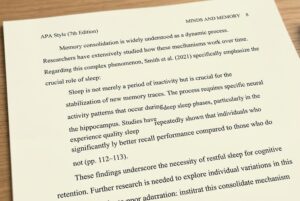
Block Quotation Example
Block quotes are fully indented 0.5 inches from the margin, and the page number is given at the end. See the image below:
How to modify quotations in APA style
- Use [brackets] to add words or clarify meaning within a quotation.
- Use an ellipsis (…) — three spaced periods — to omit words from the middle of a quotation.
- Use [sic] in italics after an error in the original to indicate it was not your mistake.
- Use italics for emphasis you have added, followed by [italics added] in brackets.
How to format tables and figures in APA style
Tables
- Tables are numbered consecutively: Table 1, Table 2, etc. (in bold).
- The title appears one double-spaced line below the label, in italic title case, flush left, not bold.
- The table itself follows one double-spaced line below the title.
- Use horizontal borders only (above and below column headings, and at the bottom of the table); avoid vertical lines and heavy borders.
- A Note below the table explains abbreviations, special characters, or copyright attributions. Start with “Note.” in italics.
Table Label / Title Format
Table 1
Demographic Characteristics of Study Participants (N = 120)
Figures
- Figures are numbered consecutively: Figure 1, Figure 2, etc. (in bold).
- The caption appears below the figure (unlike tables, where the title is above).
- Captions include a brief descriptive title in italic, followed by additional detail in non-italic text if needed.
- All figures must be referenced in the text before they appear (e.g., “As shown in Figure 2…”).
- Images must be high resolution (minimum 300 dpi for print).
Figure Caption Format
Figure 1
Mean Response Times by Condition Across Four Time Points
Note. Error bars represent ±1 SD. *p < .05.
Table vs. Figure: When to Use Which
| Use a Table When… | Use a Figure When… |
| Presenting exact numerical values | Showing trends or patterns over time |
| Comparing multiple attributes across groups | Illustrating relationships between variables |
| Displaying structured text data | Displaying photographs, diagrams, or maps |
| The reader needs to look up specific values | The overall shape of the data matters most |
How to format the reference list in APA style
Reference List Formatting Rules
- The reference list begins on a new page after the body of the paper.
- The heading “References” is centered and bold at the top of the page.
- All references are double-spaced with no extra space between entries.
- Use a hanging indent: the first line of each entry is flush left; subsequent lines are indented 0.5 inch.
- References are listed in alphabetical order by the first author’s surname.
- Include a DOI or URL for all works that have one — format as a hyperlink.
- Do not include a retrieval date unless the source content changes over time (e.g., wikis).
Author Name Formatting
| Scenario | Format |
| 1 author | Surname, I. (no “and”) |
| 2–20 authors | List all: Surname, I., Surname, I., & Surname, I. |
| 21+ authors | List first 19 authors, insert an ellipsis (…), then add the final author’s name |
| Group / organization as author | Write out the full name (no abbreviation) |
| No author | Move the title to the author position |
| Editor instead of author | Surname, I. (Ed.) or (Eds.) after names |
⚠️ Key Change from APA 6: APA 7 lists up to 20 authors before truncating. APA 6 stopped at 6. Also, the place of publication is no longer required for books.
Common Reference Types
The four key elements of any APA reference are: Who When What Where
Journal Articles
Format
Surname, I. I., & Surname, I. I. (Year). Title of article in sentence case. Journal Title in Title Case and Italics, Volume(Issue), Page–Page. https://doi.org/xxxxx
Example
Nolen-Hoeksema, S., & Watkins, E. R. (2011). A heuristic for developing transdiagnostic models of psychopathology. Perspectives on Psychological Science, 6(6), 589–609. https://doi.org/10.1177/1745691611419672
Books
Format
Surname, I. I. (Year). Title of book in sentence case and italics. Publisher.
Example
Kahneman, D. (2011). Thinking, fast and slow. Farrar, Straus and Giroux.
Edited Book Chapters
Format
Chapter Author, I. I. (Year). Title of chapter. In I. I. Editor & I. I. Editor (Eds.), Title of book (pp. xx–xx). Publisher. https://doi.org/xxxxx
Websites & Webpages
Format
Surname, I. I. (Year, Month Day). Title of webpage. Site Name. URL
Example
Centers for Disease Control and Prevention. (2023, March 15). Understanding COVID-19 vaccines. https://www.cdc.gov/vaccines/covid-19/index.html
Quick Reference: Source Type Cheat Sheet
| Source Type | Italicize | Volume/Issue | Publisher | DOI/URL |
| Journal article | Journal name + volume | Yes | No | If available |
| Book | Book title | N/A | Yes | If available |
| Edited book chapter | Book title only | N/A | Yes | If available |
| Website | Webpage title | N/A | No (use site name) | Always |
| Report | Report title | N/A | Yes | If available |
| Dissertation / Thesis | Title | N/A | Database name | If available |
| Podcast episode | Episode title | N/A | No | Always |
| YouTube video | Video title | N/A | No | Always |
Frequently Asked Questions
Where can I get a template and sample papers for APA 7 formatting?
We have a free template to format a journal article as per APA 7th edition, which you can download here. You can also download sample papers directly from APA, with or without annotations.
What if my journal guidelines ask for APA 7 formatting but also have their own requirements?
If there’s any conflict between the journal guidelines and APA 7 guidelines, follow the journal guidelines. Use APA 7 for any aspects that are not covered in the journal guidelines.
For example, your journal may ask for APA 7 formatting but also ask for the “Introduction” heading to be used. In that case, use the “Introduction” heading.
How long should a paper be in APA 7 style?
APA style doesn’t have strict limits for paper length. You should check the guidelines of your target journal and shorten or lengthen your paper accordingly.
Editage Insights APA Cheat Sheet_0.pdf